
An EPF e-Passbook is the official digital statement of your Employees’ Provident Fund (EPF) account. It is maintained by the Employees’ Provident Fund Organisation (EPFO). You can view and download it as a PDF at passbook.epfindia.gov.in or on the UMANG app. To log in, you need your activated 12-digit UAN (Universal Account Number) and password.
Key Takeaways
- One UAN, multiple Member IDs: Your UAN stays the same even when you change jobs. Each employer creates a separate Member ID under your UAN inside your EPF e-Passbook.
- Wait 6 hours after activation: You can log in to the EPF passbook portal only 6 hours after you activate your UAN or reset your password.
- Know the contribution split: Your full 12% share goes into your EPF account. Your employer’s 12% share splits into 8.33% for EPS (pension) and 3.67% for EPF.
- 2026 updates matter: The EPF interest rate for FY 2025–26 is 8.25%. Also, the official EPFO wage ceiling increased from ₹15,000 to ₹25,000 per month on 17 September 2026.
- Quick offline checks work too: You can check your latest balance by giving a missed call to 9966044425 or sending an SMS to 7738299899. Your UAN must be activated and linked with your KYC details for this to work.
Millions of salaried employees in India see Provident Fund (PF) deductions on their monthly salary slips. Yet many people rarely check if that money actually reaches their EPFO account on time.
Checking your EPF e-Passbook solves this problem in minutes. It gives you a clear, month-by-month record of your deposits, your employer’s share, pension contributions, yearly interest, and any withdrawals or transfers.
This guide shows you how to activate your UAN, download your EPF passbook online or on your phone, read every column in your statement, and fix common portal errors.
What Is an EPF e-Passbook and What Is UAN?

What Is EPF e-Passbook?
The EPF e-Passbook (electronic passbook) is an online record maintained by the Employees’ Provident Fund Organisation (EPFO). It helps employees track contributions, interest credits, and other transactions in their Provident Fund account.
Similar to a bank passbook, it provides a record of your PF account activity. You can use it to check details such as:
Passbook entries are generally updated after the employer files the monthly Electronic Challan-cum-Return (ECR), pays the applicable contributions, and EPFO processes the details. Updates may not appear immediately after salary is credited.
What Is a UAN Number?
The Universal Account Number (UAN) is a permanent 12-digit identification number assigned by EPFO to a member. It acts as a central identifier for linking the Member IDs created during different periods of employment.
Think of your UAN as one main umbrella ID. Even if you work for five different companies during your career, your UAN generally remains the same. Each employer creates or reports a separate PF Member ID, and these Member IDs can be linked to your UAN.
Company A
Company B
Company C
After activating your UAN and completing the required login and verification steps, you can access EPFO member services, view eligible PF details, and use the online passbook facility.
How to Activate UAN on the EPFO Member Portal
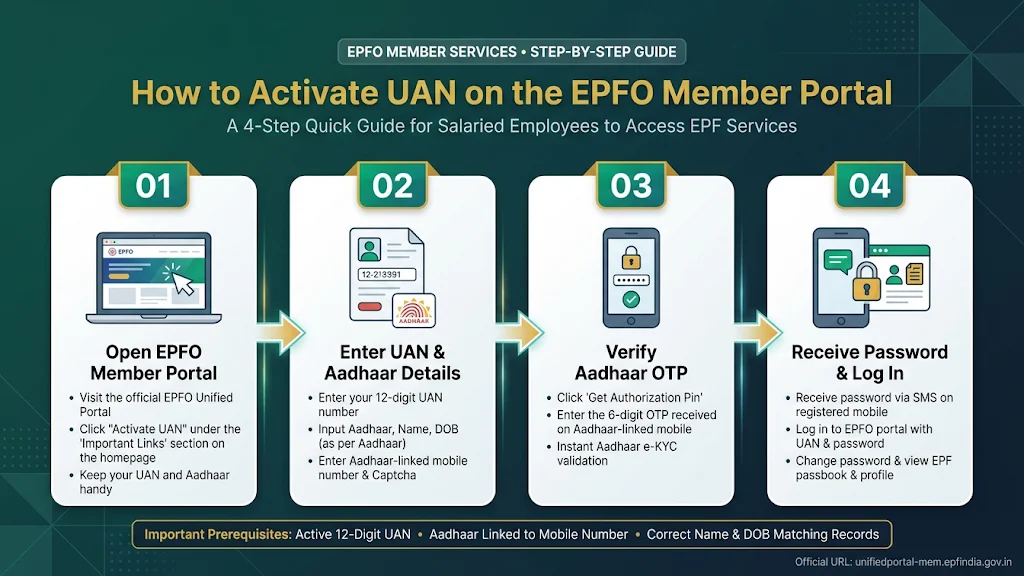
If you got your UAN on your salary slip or from your HR team, you must activate it once before logging in. Keep your Aadhaar number, PAN, and Aadhaar-linked mobile number ready.
- Visit the official EPFO Member e-Sewa Portal.
- Under the Important Links section on the right, click Activate UAN.
- Enter your 12-digit UAN, Aadhaar number, Name, Date of Birth, and Aadhaar-linked mobile number.
- Type in the captcha code, tick the Aadhaar consent box, and click Get Authorization PIN.
- Enter the OTP (One-Time Password) sent to your Aadhaar-linked mobile number and click Validate OTP and Activate UAN.
- EPFO will send a system-generated password to your registered mobile number by SMS.
Important: Log in to the Member e-Sewa portal and change this temporary password right away. After activating your UAN or changing your password, wait at least 6 hours before opening the passbook website.
How to Check and Download EPF Passbook Online
Once your UAN is active and the 6-hour wait time is over, you can download your EPF statement. You can use either the official web portal or the UMANG mobile app.
Method 1: Through the EPFO Member Passbook Portal
You can access your EPF e-Passbook directly through the official EPFO Member Passbook Portal using your UAN and login credentials.
Visit the official EPFO Member Passbook Portal.
Enter your 12-digit UAN, UAN Member Portal password, and the displayed captcha. Click Sign In.
Complete OTP verification on your registered mobile number if the portal requests it.
Once logged in, select the Member ID (PF account) you want to check.
Click View Passbook to access your available year-wise and month-wise transaction statement.
Use the available Download or PDF option to save your passbook for future reference.
Method 2: Through the UMANG App (EPFO Services)
The UMANG (Unified Mobile Application for New-age Governance) app provides access to EPFO services on supported Android and iOS devices.
Download and open the UMANG app. Sign in using the available mobile login method.
Search for EPFO in the services section and open it.
Under Employee Centric Services, select View Passbook.
Enter your UAN and tap Get OTP.
Enter the OTP received on your registered mobile number and tap Submit.
Select the required Member ID to view your passbook and use the available download option if provided.
Alternative Ways: EPF Balance Check via Missed Call and SMS
If you only want a quick balance check instead of the full PDF statement, EPFO offers two free offline options. For both methods, your UAN must be activated and linked with at least one KYC (Know Your Customer) document, such as Aadhaar, PAN, or your bank account.
| Method | How to Use | Requirements | What You Receive | Best Used For |
|---|---|---|---|---|
| EPFO Passbook Portal | Log in at passbook.epfindia.gov.in | Activated UAN, password, internet | Full month-by-month statement and PDF download | Audits, tax or loan proof, checking employer ECR deposits |
| UMANG App | Navigate to EPFO, select Employee Centric Services, and click on View Passbook. | Smartphone, UMANG login, UAN + OTP | Member-wise balance and PDF download | Quick mobile access without a desktop browser |
| Missed Call Service | Give a missed call to 9966044425 from your registered mobile | Activated UAN + KYC linked | SMS with total PF balance and last contribution | Instant balance check when portals are slow |
| SMS Service | Send EPFOHO UAN ENG to 7738299899 | Activated UAN + KYC linked | SMS with balance and last contribution in your chosen language | Checking balance without internet; supports 10 Indian languages |
Tip: To get the SMS in Hindi, Marathi, Tamil, or Bengali, replace ENG with HIN, MAR, TAM, or BEN (the first three letters of the language).
EPF Passbook Details Explained (Contributions, Pension & Interest)
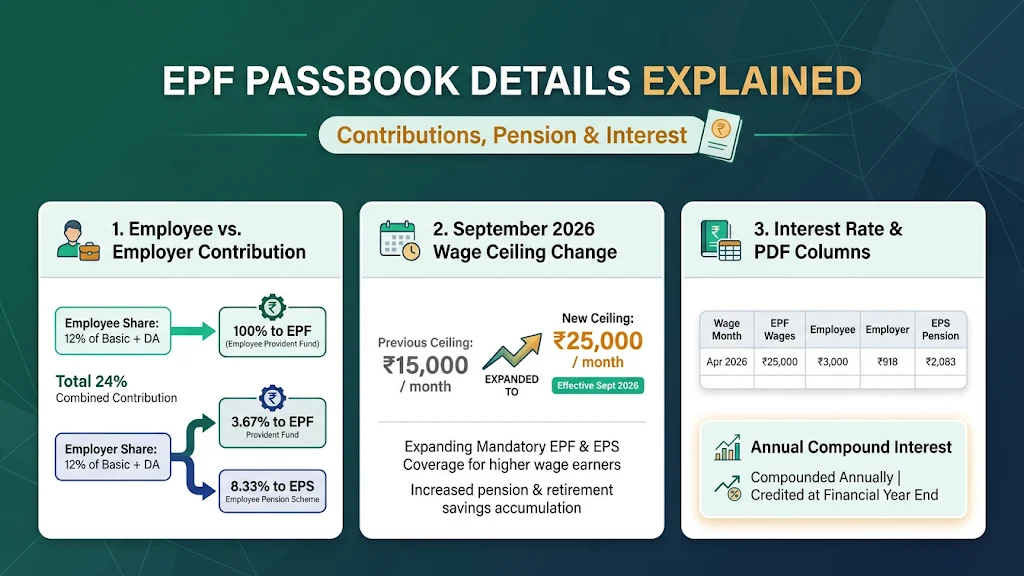
Many employees feel surprised when they open their EPF e-Passbook and see that their employer’s deposit looks much smaller than theirs. Knowing how EPFO splits these amounts clears this up right away.
1. Employee Contribution vs. Employer Contribution
Under EPF rules (EPFO Scheme):
- EPF Employee Share: You deposit 12% of your Basic Pay and Dearness Allowance (DA), with the full 100% credited directly into your EPF balance.
- EPF Employer Contribution: Your employer also pays 12% of your PF wages, but it is split into two parts:
- 8.33% goes toward the Employees’ Pension Scheme (EPS), up to the official wage ceiling.
- 3.67% goes toward your EPF account.
- EDLI Insurance: Your employer also pays a separate 0.5% toward the Employees’ Deposit Linked Insurance (EDLI) scheme. This sum is not reflected in your EPF savings balance column.
2. The September 2026 Wage Ceiling Change (₹15,000 to ₹25,000)
Through a Government of India notification effective 17 September 2026, the official EPFO wage ceiling increased from ₹15,000 to ₹25,000 per month (PMIndia, BDO India).
What this means for your passbook: Employees earning up to ₹25,000 per month now fall under mandatory EPF, EPS, and EDLI coverage. For EPS-eligible members under the ₹25,000 ceiling, the 8.33% pension share is capped at ₹2,083 per month (up from the old ₹1,250 cap on ₹15,000). The rest of the employer’s 12% goes into EPF.
3. Interest Rate and PDF Columns
Interest Rate: For FY 2025–26, the Central Board of Trustees recommended—and the government approved—an 8.25% yearly interest rate on EPF balances (PIB). EPFO calculates interest every month on your running balance and adds it once a year after government approval.
Key Columns in Your Passbook PDF:
- Wage Month & Credit Date: The salary month for which PF was deducted and the date your employer deposited it.
- EPF Wages & EPS Wages: The salary amount used to calculate your PF and pension shares.
- Employee Share: Your 12% monthly deposit, plus any Voluntary Provident Fund (VPF) you choose to add.
- Employer Share: The 3.67% share (plus any amount above the EPS cap) added to your EPF balance.
- Pension Contribution: The 8.33% EPS deposit. This money does not earn EPF interest. It is tracked separately for monthly pension eligibility after 10 years of service.
Other Key EPFO Digital Services in India
Your UAN member portal login gives you access to several useful self-service tools beyond viewing your passbook:
- EPF Account Transfer Online (Form 13): When you change jobs, do not withdraw your PF early. Log in to unifiedportal-mem.epfindia.gov.in, go to Online Services > One Member – One EPF Account (Transfer Request), and merge your old Member ID into your current one. This preserves your complete service history and keeps your accrued interest tax-exempt.
- Online Claims & Advances: Submit Form 31 (partial advance), Form 19 (final EPF settlement), or Form 10C (pension withdrawal or scheme certificate) online. Once your Aadhaar, PAN, and bank KYC are verified, you do not need paper signatures from your employer.
- KYC & E-Nomination: Update your bank account IFSC, PAN, and Aadhaar details online. You can also file an e-nomination to protect your family’s claim rights.
- Track Claim Status: Check live updates on your claim on the EPFO Claim Status page or inside the passbook dashboard.
Common EPF Passbook Problems and How to Fix Them
“Invalid Username or Password” Right After UAN Activation or Reset
- Cause: EPFO’s passbook server syncs with the Member e-Sewa portal in batches, not instantly.
- Fix: Wait 6 to 24 hours after activating your UAN or changing your password before logging in to passbook.epfindia.gov.in.
Latest Month’s Contribution Not Showing
- Cause: Employers have until the 15th of the next month to file their ECR and deposit PF money. Also, some companies run exempted PF trusts (company-managed trusts), which issue their own statements instead of showing monthly credits on the EPFO passbook portal.
- Fix: Check again after the 15th–20th of the next month. If it is still missing, ask your HR team if your company runs an exempted trust or request the ECR filing receipt.
Passbook Portal Timing Out or Showing Session Exception
- Cause: Heavy website traffic around mid-month ECR deadlines or saved browser cookies.
- Fix: Open the portal in an Incognito or Private window, clear your browser cache, or use the UMANG app or Missed Call service (9966044425) instead.
OTP Not Received During Login or Activation
- Cause: Your current mobile number does not match the number linked to your Aadhaar.
- Solution: Update your mobile number in Aadhaar by visiting an Aadhaar Seva Kendra, or verify your registered mobile number directly in your Member e-Sewa account.
Old Company Balance Missing from Total
- Cause: Your previous employer’s Member ID has not been transferred to your current Member ID yet.
- Fix: Select your old Member ID from the passbook dropdown to check the balance. Then submit an online Form 13 transfer request on the Member e-Sewa portal.
Frequently Asked Questions (FAQ)
1. What is EPF e-Passbook?
An EPF e-Passbook is an official digital account statement from EPFO. It records all monthly employee deposits, employer EPF and EPS deposits, yearly interest credits, and withdrawals for every Member ID linked to your UAN.
2. How can I download my EPF passbook online?
Visit passbook.epfindia.gov.in and sign in with your activated 12-digit UAN, password, and captcha. Verify the OTP, select your Member ID, click View Passbook, and choose Download as PDF. You can also download it on the UMANG app under EPFO > View Passbook.
3. How many hours does it take to open the EPF passbook after activating UAN?
It takes at least 6 hours after activating your UAN or resetting your password on the Member e-Sewa portal for your details to sync with the passbook server. If you still see an error, wait up to 24 hours and try opening the site in an Incognito browser window.
4. Can I check my EPF balance without a UAN password?
Yes. If your UAN is already activated and linked with Aadhaar, PAN, or your bank account, you do not need a password. Simply give a free missed call to 9966044425 or send EPFOHO UAN ENG by SMS to 7738299899 from your registered mobile number.
5. Why is my employer’s contribution less than my contribution in the EPF passbook?
Both you and your employer contribute 12% of your PF wages, but your full 12% goes into EPF. Your employer’s 12% is split: 8.33% goes to the Employees’ Pension Scheme (EPS) up to the official wage ceiling, and only 3.67% (plus any amount above the EPS cap) goes into your EPF column.
Read This Also:
What Is Sanchar Saathi? 7 Free Tools to Stop Fraud and Block Stolen Phones (2026 Guide)
1 thought on “EPF e-Passbook 2026: Check Balance, Download PDF & Fix Login Errors”