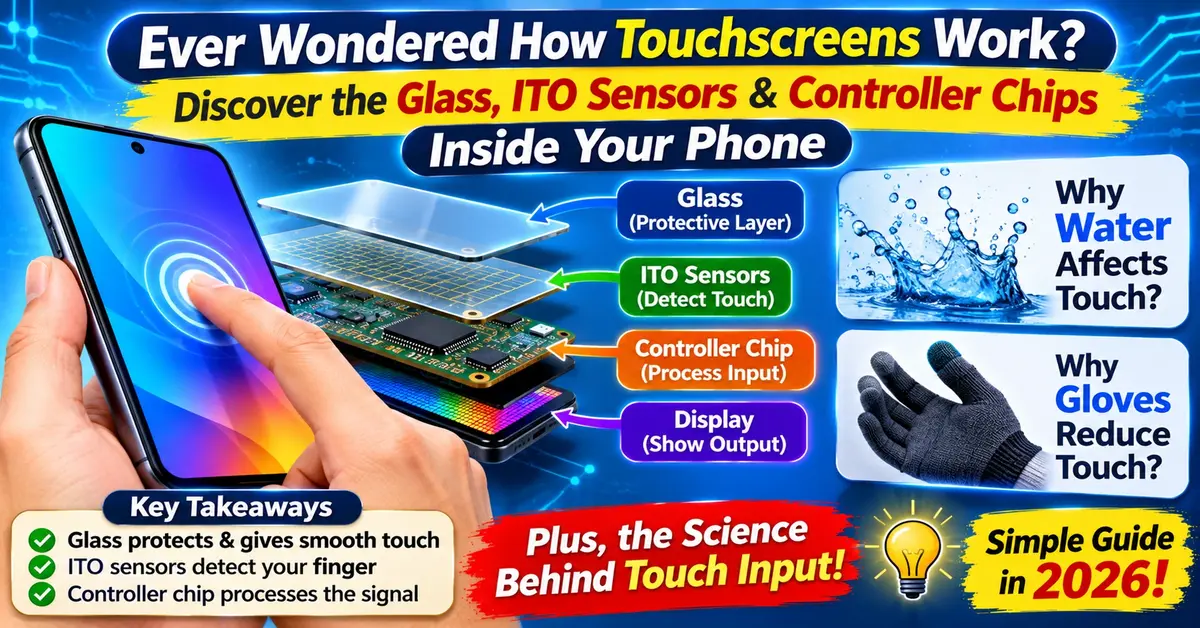
A touchscreen turns your physical touch into an electrical signal that a processor can read. Most modern smartphones use capacitive touchscreen technology. It senses tiny changes in an electric field when your finger touches the glass. Older ATMs and retail billing machines often use resistive touchscreen technology. This type detects physical pressure when two thin layers press together (McGill University OSS).
Key Takeaways
- Two main technologies lead the market: Smartphones and tablets use projected capacitive (PCAP) screens. Rugged industrial panels, older ATMs, and many budget billing machines use resistive screens (Mouser Electronics).
- Your body carries electricity: Capacitive screens react to the natural electric charge in human skin. That is why bare fingers work, while plastic pens and thick woollen gloves do not (McGill University OSS).
- Multi-touch uses mutual capacitance: Crossing rows and columns of clear sensors track several fingers at once without mixing up their spots (Texas Instruments).
- Styluses work in two ways: Passive styluses simply act like a fingertip. Active styluses have tiny electronics inside for fine tips, pressure sensitivity, and palm rejection (HP Tech Takes).
What Is Touchscreen Technology?
Touchscreen technology combines two parts: a display that shows the picture, and a sensor layer that detects your touch. Instead of needing a separate mouse or keypad, the screen works as both the monitor and the pointing device (Wikipedia).
Touchscreen Display Components Explained
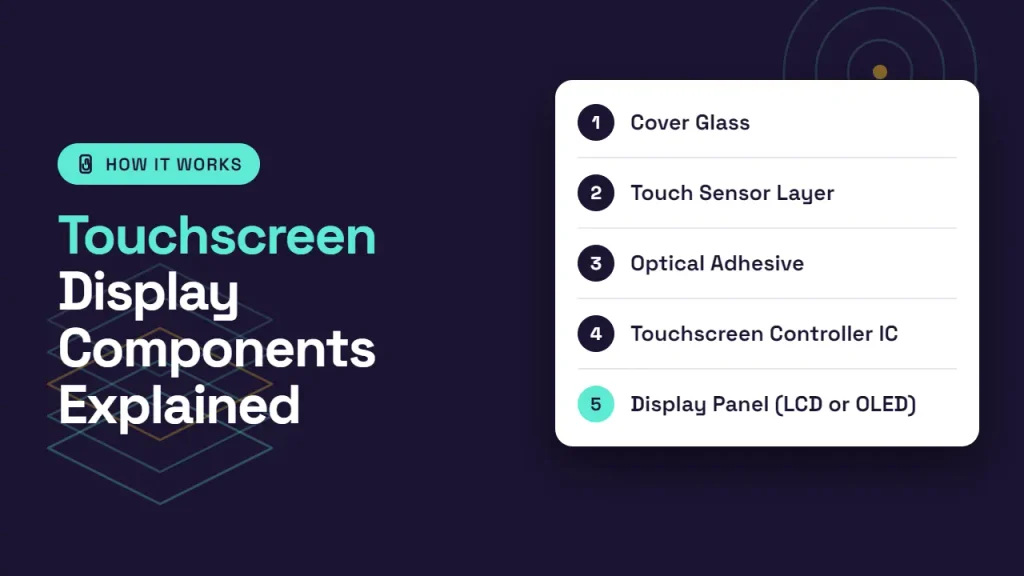
When you look at a smartphone screen, you are looking through a thin stack of five touchscreen display components:
- Cover Glass: This is the tough outer layer you touch every day. Modern phones use chemically strengthened aluminosilicate glass, such as Corning Gorilla Glass. Makers swap smaller sodium ions for larger potassium ions in a hot salt bath. This process helps the glass resist scratches and drops (McGill University OSS).
- Touch Sensor Layer: This is a tiny, see-through grid coated onto glass or film. It is usually made from Indium Tin Oxide (ITO), a clear material that carries electricity while letting up to 90% of light pass through (Texas Instruments; Wikipedia).
- Optical Adhesive: This crystal-clear glue bonds the touch sensor tightly to the glass and display without blurring the image.
- Touchscreen Controller IC: This is a dedicated microchip (integrated circuit) that scans the sensor grid hundreds of times every second. It filters out electrical noise and turns raw signal changes into X-Y screen coordinates for your phone’s software (Metal Domes; TI CapTIvate Guide).
- Display Panel (LCD or OLED): This light-emitting layer sits at the bottom and shows the apps, text, and videos you see.
How Does a Capacitive Screen Work?
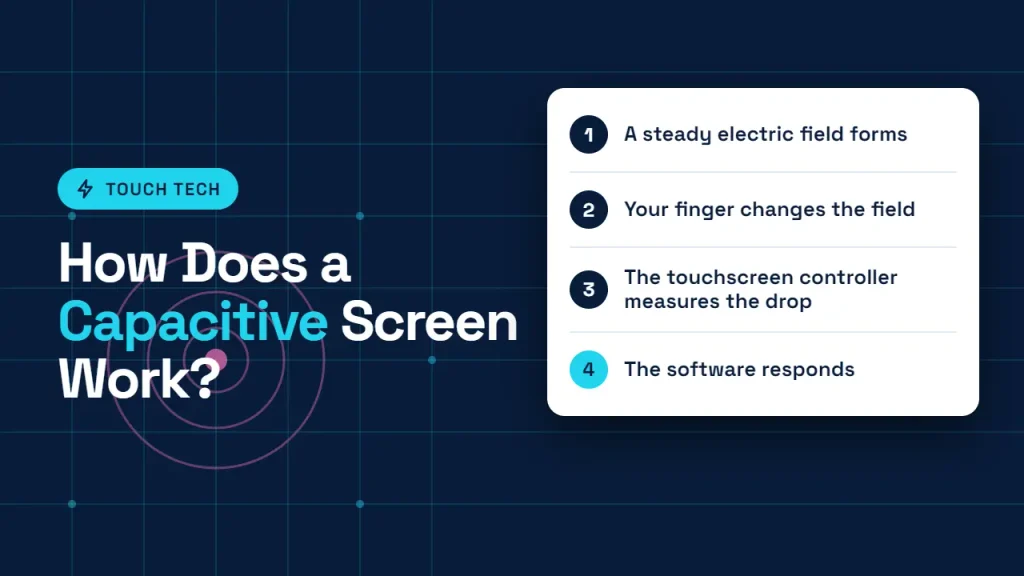
If you want to know how smartphone touchscreens work, the answer is almost always projected capacitive touchscreen (PCAP) technology (Butler Technologies).
Here is what happens the moment your finger taps the glass:
- A steady electric field forms: The ITO sensor grid under the cover glass holds a small, even electrostatic field (a steady electric charge) (HP Tech Takes).
- Your finger changes the field: The human body is a natural conductor of electricity. When your fingertip touches the glass, it draws a tiny, harmless electric charge and changes the capacitance (the amount of charge stored) at that exact spot (McGill University OSS).
- The touchscreen controller measures the drop: The controller IC constantly compares live readings against a “no-touch” baseline. When it spots a clear drop in capacitance, it finds the exact X and Y coordinates (Metal Domes).
- The software responds: Your phone’s operating system receives those coordinates. It then opens the app, types the letter, or scrolls the page.
Because capacitive sensors read electric fields right through the glass, the screen does not need to bend. That is why smartphone screens feel solid and last for years without wearing out from taps.
Multi-Touch Technology Explained: Self vs. Mutual Capacitance
Early touchscreens could only track one finger at a time. Today, zooming in on Google Maps or playing mobile games needs multi-touch technology. How does the screen tell two or five fingers apart?
Projected capacitive screens use two main touchscreen sensor designs (Wikipedia):
- Self-Capacitance: Each row and column measures its own electric load against the ground. It gives a strong signal, which works well for single taps, buttons, or thin gloves. However, if two fingers touch at once, the controller sees two active rows and two active columns. It cannot tell which pair of crossing points is real—an error engineers call ghosting (Texas Instruments).
- Mutual Capacitance: Rows act as transmitters and columns act as receivers. Together, they form a tiny, separate capacitor at every crossing point on the grid. For example, a 12-by-16 grid creates 192 separate sensing points (Wikipedia). When your finger touches a point, it pulls away part of the electric field between that exact row and column. Because the controller checks every crossing point on its own, it tracks multiple fingers, palms, and swipes at the same time with zero ghosting (NIH / PMC Review).
How Does a Resistive Screen Work?
Resistive touchscreen technology works purely on physical pressure, not electricity from your skin (McGill University OSS).
A resistive screen has two thin, flexible sheets coated with a conductive layer. Tiny spacer dots keep them slightly apart. When you press the outer plastic layer with a finger, fingernail, pen cap, or gloved hand, the top sheet bends inward and touches the bottom sheet. That contact completes an electric circuit and changes the voltage at that spot, so the controller can calculate where you pressed (McGill University OSS; Wikipedia).
In India, you still see resistive touchscreens every day on older bank ATMs, medical diagnostic machines, factory control panels, and tough retail POS billing machines (IndiaMART POS Listings). Businesses like them because they cost less to make and work reliably even when the user wears gloves or uses a simple plastic stylus (NIH / PMC Review).
(Note: A third, less common type is Surface Acoustic Wave (SAW). It sends ultrasonic sound waves across a glass panel and detects touch when your finger absorbs part of the wave. It gives sharp clarity for indoor information kiosks, though dust or water drops can block the waves (HP Tech Takes; Wikipedia).)
Resistive vs. Capacitive Touchscreen: Side-by-Side Comparison
| Feature | Capacitive Touchscreen (PCAP) | Resistive Touchscreen |
|---|---|---|
| How it detects touch | Measures changes in an electrostatic field (HP Tech Takes) | Measures physical pressure between two layers (McGill University OSS) |
| What works on it | Bare fingers, conductive gloves, capacitive/active styluses | Fingers, fingernails, gloves, any plastic or wooden stylus |
| Multi-touch support | Yes; supports pinch, zoom, and multi-finger gestures | Usually single-touch only |
| Sensitivity | Light tap (no pressing needed) | Needs firm physical pressure |
| Screen clarity & durability | High clarity; hard, scratch-resistant glass | Slightly duller due to extra plastic layers; softer surface |
| Water / rain behaviour | Water drops can trigger false “ghost” touches | Handles splashes better, as water has no pressure |
| Common Indian uses | Smartphones, tablets, laptops, modern UPI POS terminals | Older ATMs, kirana/retail billing machines, industrial & medical panels |
How Does a Touchscreen Stylus Work? (Active vs. Passive Stylus)

Not all styluses work the same way. When shopping in India, you will see huge price gaps between a ₹200 pen and a ₹5,000+ stylus. The reason comes down to active vs. passive stylus design (HP Tech Takes).
Passive Stylus (Capacitive Stylus)
A passive stylus does not contain a battery, Bluetooth connection, or active electronic components. It uses a conductive rubber, silicone, or mesh tip to interact with the touchscreen, much like a human fingertip.
Typical budget: ₹199–₹499Advantages
- Affordable and widely available.
- No battery or charging required.
- Works with most standard capacitive touchscreen phones and tablets.
- Simple to use for tapping, scrolling, and basic navigation.
Limitations
- Usually has a thicker, less precise tip.
- No electronic pressure sensitivity.
- No active tilt detection.
- Generally lacks palm rejection, so resting your hand on the screen may register unwanted touches.
Active Stylus
An active stylus contains electronic components and communicates with a compatible touchscreen digitiser. Depending on the model, it may use a battery or rechargeable power source and support advanced writing and drawing features.
Typical budget: ₹699–₹10,000+Advantages
- Fine tip for more accurate notes and drawing.
- Pressure sensitivity on supported devices and apps.
- Tilt detection on compatible models.
- Palm rejection on supported device and stylus combinations.
- Better suited to handwriting, sketching, and digital artwork.
Limitations
- Usually more expensive than passive styluses.
- Some models require charging or battery replacement.
- Compatibility is limited to supported devices and stylus protocols.
- Advanced features may not work across every app or device.
Common Touchscreen Problems & Quick Fixes
- Screen goes crazy in monsoon rain or with sweaty hands: Water conducts electricity. Raindrops on a capacitive screen disturb the electric field at several spots at once, causing random “ghost touches” (McGill University OSS). Wipe the glass dry with a clean cloth before typing.
- Touch feels slow after applying tempered glass: Very thick or poorly glued screen guards increase the gap between your finger and the ITO sensor, weakening the capacitance change. Many Android phones have a “Touch sensitivity” toggle in Display Settings to boost detection through thicker guards.
- Regular winter gloves do not work: Wool, cotton, and leather block your body’s electric charge from reaching the screen. Look for touchscreen gloves with conductive thread woven into the thumb and index fingertips (McGill University OSS).
Final Takeaway
Every tap on your smartphone relies on a fast team effort: strengthened glass, a clear ITO sensor grid, and a touch controller chip measuring tiny shifts in an electric field. Capacitive touchscreens lead on phones and tablets because of their clarity and multi-touch speed. Meanwhile, resistive touchscreens still do steady work on ATMs and billing counters across India, where gloves, styluses, and heavy daily presses matter most.
Frequently Asked Questions (FAQ)
1. How does a touchscreen know where I am touching?
Beneath the glass sits an invisible grid of conductive rows and columns, usually made of Indium Tin Oxide (ITO). When your finger touches the screen, it changes the electrical capacitance (on a capacitive screen) or presses two layers together (on a resistive screen) at a specific crossing point. A touch controller chip reads those X and Y coordinates and sends them to your device’s processor (HP Tech Takes; Metal Domes).
2. Why does a capacitive touchscreen not work with regular gloves or a plastic pen?
Capacitive screens rely on the natural electricity in human skin to disturb their electrostatic field. Regular wool, cotton, or leather gloves—and ordinary plastic pens—block that electric charge, so the sensor registers nothing (McGill University OSS).
3. Why does water or sweat cause ghost touches on my phone?
Water conducts electricity well. When raindrops or sweat land on a capacitive screen, they disturb the electric field across several sensor points at once. The touch controller reads those changes as multiple finger taps, making apps open or scroll on their own (McGill University OSS).
4. What is the main difference between a resistive and a capacitive touchscreen?
A resistive screen senses physical pressure when two flexible conductive layers are pushed together, so it works with any object (finger, glove, or plastic stylus). A capacitive screen senses electric changes from a conductive finger or stylus through solid glass, giving sharper visuals and multi-touch gestures (McGill University OSS; Mouser Electronics).
5. What is a projected capacitive (PCAP) touchscreen?
Projected capacitive (PCAP) is the modern capacitive design used in almost all smartphones and tablets. Instead of a single conductive coating, it uses an etched X-Y grid of clear electrodes behind protective glass. This lets the electric field “project” through thick cover glass and allows accurate multi-touch tracking (Mouser Electronics; Butler Technologies).
Read This Also:
Android Security Sandbox Explained: 5 Hidden APK Risks & Safety Guide (2026)