
Cloud computing means delivering computing services over the internet on a pay-as-you-go model. These services include servers, storage, databases, networking, software, and data analytics. Instead of buying and maintaining physical servers in your own office data centre, you rent computing power, storage, and software from cloud providers. Leading service providers consist of Amazon Web Services (AWS), Microsoft Azure, and Google Cloud Platform (GCP).
Key Takeaways
- On-Demand Utility: Cloud computing works like electricity in your home. You plug in, use what you need, and pay only for what you consume.
- Core Technology: Virtualization separates physical hardware from software. This allows one physical computer to run many secure, independent virtual machines at the same time.
- Three Main Models: Infrastructure as a Service (IaaS) offers raw hardware. Platform as a Service (PaaS) gives developers tools to build software. Software as a Service (SaaS) delivers ready-to-use apps over the web.
- Storage vs Compute: Cloud storage saves your files safely.Cloud computing delivers the active processing capacity and memory required to execute software programs.
- Financial Shift: Businesses move from heavy upfront capital spending (CapEx) to flexible day-to-day operating costs (OpEx).
- Indian Enterprise Context: Global cloud providers run local data centres in Mumbai, Chennai, Hyderabad, and Delhi NCR. This ensures fast speeds and helps companies follow Indian laws, such as the Digital Personal Data Protection Act (DPDPA 2023) and RBI data rules.
From Physical Server Rooms to On-Demand Power

Twenty years ago, launching a website or software product was expensive. A company had to buy heavy physical servers, rent space in a cooled server room, hire network engineers, and lay power cables. Getting hardware delivered and set up took weeks.
If visitor traffic spiked, servers crashed under the load. If traffic dropped, expensive equipment sat idle while losing value.
Cloud computing changed this completely.
Cloud providers built large data centres packed with enterprise-grade servers worldwide. By adding smart management software on top of this hardware, they turned computing into a simple public utility.
Today, whether an independent developer launches a mobile app or a major Indian bank processes crores of transactions, computing power is available instantly at scale.
How Does Cloud Computing Work?
Cloud computing is not invisible air; it runs inside secure physical data centres across the world. These buildings house thousands of servers, solid-state drives (SSDs), high-speed fibre-optic cables, cooling units, and backup power generators.
When you use the cloud, four main layers work together:
USER INTERFACE LAYER
Web Consoles (AWS/Azure/GCP), APIs, CLI Tools, SDKs
MANAGEMENT & ORCHESTRATION
Automated Resource Allocation, Identity, User Billing
VIRTUALIZATION LAYER
Type-1 Hypervisors (KVM, ESXi, Xen) dividing hardware
PHYSICAL HARDWARE LAYER
Multicore CPUs (x86/ARM), RAM, NVMe Drives, Fibre SDN
1. The Physical Layer
Data centres house server racks connected to redundant power grids and high-speed internet backbones. Cloud providers manage physical security, cooling systems, hardware checks, and part replacements 24/7.
2. The Virtualization Layer (The Engine of the Cloud)
A single application rarely needs all the power of a modern server. Cloud computing uses virtualization to solve this.
Virtualization uses a software layer called a hypervisor (such as KVM, VMware ESXi, or Xen). The hypervisor divides one physical computer’s CPU, RAM, and storage into several independent virtual computers. These are called Virtual Machines (VMs) or lightweight containers.
Each VM runs its own operating system (like Linux or Windows). It stays completely separate and secure from other VMs running on the same physical machine.
3. The Management and Orchestration Layer
When you request a virtual server through an online console or API (Application Programming Interface), orchestration software takes over:
- It checks server capacity across the data centre.
- It selects a physical computer with available resources.
- It sets up your virtual machine image.
- It assigns private and public IP addresses.
- It connects virtual storage disks.
You receive an active, ready-to-use login screen within seconds.
Are cloud computing and cloud storage actually the same concept?
Many people confuse cloud storage with cloud computing. While they work together, they do different jobs.

- Cloud Storage only saves, backs up, and retrieves static files over the internet. Prominent instances consist of Google Drive, Microsoft OneDrive, Dropbox, and Amazon S3. Its main job is keeping your data safe, backed up across locations, and easy to access.
- Cloud Computing actively processes data and runs programs. It supplies the CPU processing cycles and working memory (RAM) needed to execute code, run database searches, edit video, train AI models, and handle user requests.
In simple terms: Cloud storage holds your files; cloud computing runs your applications.
The 3 Main Cloud Service Models: IaaS, PaaS, and SaaS
The National Institute of Standards and Technology (NIST SP 800-145) defines three standard cloud service models. The difference depends on how much you manage yourself versus how much the provider manages for you.
IaaS
You manage the infrastructure
PaaS
You focus on your code
SaaS
Provider manages everything
Items in brackets are managed by your team.
An Everyday Comparison: Eating Food
- On-Premise (Cooking at Home): You buy groceries, own the stove, cook the meal, wash dishes, and set the dining table.
- IaaS (Renting a Commercial Kitchen): A kitchen facility gives you the gas connection, burners, and fridge. You bring your own chef, recipes, utensils, and ingredients to cook the dish.
- PaaS (Ordering Meal Delivery): A restaurant cooks, packs, and delivers the meal to your doorstep. You provide plates and cutlery, and decide how to serve it.
- SaaS (Dining Analogy): Consumers sit at an establishment, select items from a menu, consume the prepared service, settle the invoice, and depart. You do not worry about kitchen cleaning, cooking equipment, or ingredients.
Detailed Comparison: IaaS vs PaaS vs SaaS
| Feature | Infrastructure as a Service (IaaS) | Platform as a Service (PaaS) | Software as a Service (SaaS) |
|---|---|---|---|
| What It Is | Raw computing, storage, and networking rented on-demand. | Ready-to-use platforms to build and deploy software. | Complete, ready-to-run software accessed through a web browser or app. |
| Best For | Cloud architects, DevOps engineers, and system admins. | Software developers, data engineers, and web programmers. | Business teams, office workers, and everyday consumers. |
| What You Manage | Operating systems, software patches, firewalls, apps, and data backups. | Application code, software libraries, settings, and user permissions. | Only your login account, settings, and personal data. |
| What Vendor Manages | Physical hardware, power, cooling, and hypervisor software. | Operating system, server setup, database engines, and network routing. | The entire application, server updates, uptime, and security. |
| Key Advantage | Full control over operating systems and network settings. | Faster development because you skip server setup tasks. | Instant use with zero software installation or maintenance. |
| Common Examples | Amazon EC2, Microsoft Azure VMs, Google Compute Engine, Linode. | AWS Elastic Beanstalk, Google App Engine, Heroku, Red Hat OpenShift. | Google Workspace, Microsoft 365, Salesforce, Zoho Workplace, Canva, Slack. |
The National Institute of Standards and Technology establishes the global benchmark in its NIST SP 800-145 framework, categorising cloud systems into Infrastructure as a Service (IaaS), Platform as a Service (PaaS), and Software as a Service (SaaS).
Cloud Deployment Types: Public, Private, Hybrid, and Community
Cloud deployment types depend on where and how resources are hosted:
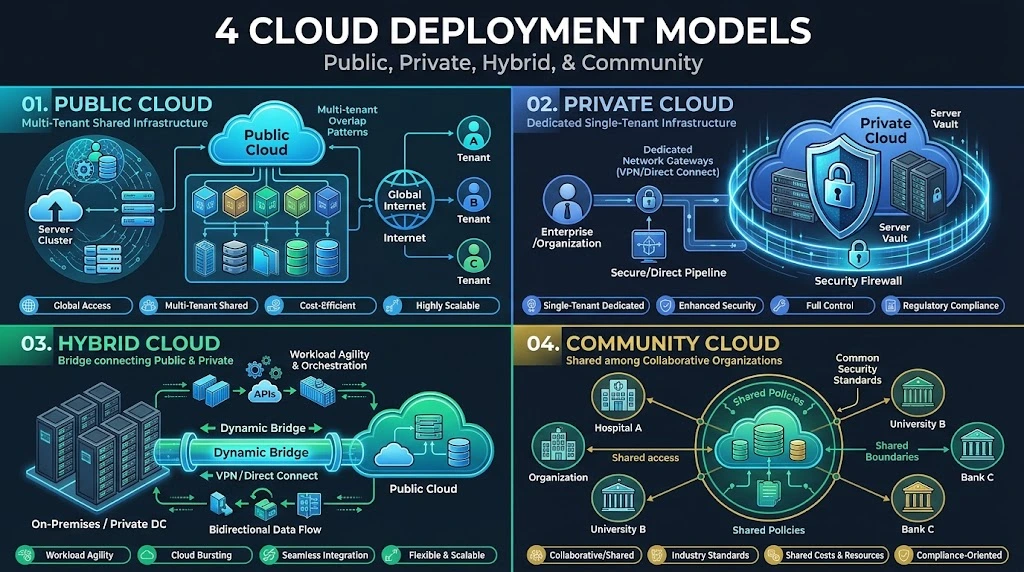
1. Public Cloud
In a public cloud, an outside provider owns and runs all hardware, network gear, and data centres. Different companies share the same physical equipment through secure, separate accounts. Public clouds offer massive scalability and require no upfront hardware costs.
- Industry Leaders: Amazon Web Services (AWS), Microsoft Azure, and Google Cloud Platform (GCP).
2. Private Cloud
A private cloud serves only one organization. It can sit inside the company’s own office data centre or be hosted off-site by an independent data centre provider. Private clouds give businesses complete control over hardware security and data compliance, but they cost significantly more to set up and run.
- Common Users: Large commercial banks, defence agencies, and hospital networks using platforms like OpenStack or VMware Cloud Foundation.
3. Hybrid Cloud
A hybrid cloud securely bridges private and public environments.
This setup allows cloud bursting. A company can keep sensitive customer data safely in its private on-site database to follow local regulations. When customer traffic suddenly surges, the application borrows extra computing power from the public cloud.
4. Community Cloud
A community cloud is shared by several organizations that have similar security, legal, or industry needs (such as government departments or banks). Members share the infrastructure costs.
- Example in India: The National Informatics Centre operates NIC MeghRaj, a dedicated government cloud built specifically for central and state government departments.
In India, the public sector utilizes this model via the MeitY GI Cloud (MeghRaj), a shared governmental cloud ecosystem tailored for union and state departments.
Traditional On-Premise Computing vs Cloud Computing
| Factor | Traditional On-Premise Setup | Cloud Computing |
|---|---|---|
| Cost Model | CapEx (Capital Expense): Heavy upfront spending on servers and licences, depreciated over 3–5 years. | OpEx (Operating Expense): Pay-as-you-go utility model with zero upfront hardware purchases. |
| Setup Time | Weeks or months to order, mount, wire, and configure physical hardware. | Seconds or minutes to launch virtual servers or databases through an online dashboard. |
| Scalability | Fixed limit based on physical hardware; risk of crashes during high traffic or wasted capacity when quiet. | Elastic and automatic; easily adds or removes virtual servers as user traffic changes. |
| Hardware Maintenance | Your in-house IT team must replace damaged disks, power units, and update firmware. | The cloud provider handles all repairs, component replacements, and facility upkeep. |
| Disaster Recovery | Requires building or renting a second data centre in another city at high cost. | Providers replicate data across multiple locations automatically for fast recovery at low cost. |
| Aging Hardware | High risk; hardware bought today becomes outdated in 3 to 4 years. | Low risk; cloud providers upgrade their hardware regularly with the latest processors. |
Real-World Examples of Cloud Computing
Cloud computing powers most digital tools we use every day:
Global Consumer Services
- Streaming Media (Netflix, Spotify, YouTube): Instead of storing files on your phone, video and music stream smoothly from cloud delivery servers located near you.
- Generative AI (ChatGPT, Google Gemini): Training and running massive AI models requires thousands of specialized processors (GPUs and TPUs) running together in cloud data centres.
The Indian Digital Ecosystem
- Unified Payments Interface (UPI): Managed by the National Payments Corporation of India (NPCI) alongside apps like PhonePe, Google Pay, and Paytm. Cloud systems scale up automatically during festive sales like Diwali to process billions of monthly payments without delays.
- IRCTC Tatkal Booking: During peak Tatkal windows at 10:00 AM and 11:00 AM, user visits skyrocket. Cloud and virtual server pools expand immediately to process surges in ticket bookings, then shrink back down once demand drops.
- DigiLocker & Aadhaar: Administered by MeitY. These cloud services let Indian citizens securely store and fetch official documents—such as driving licences, PAN cards, and mark sheets—on their phones without paper copies.
Key Benefits of Cloud Computing
- Faster Innovation: Teams can test new software ideas, build prototypes, and launch apps in hours instead of waiting months for physical servers.
- Flexible Scaling: You can scale resources in two ways:
- Vertical Scaling (Scale-Up): Adding more CPU power or RAM to an existing virtual server.
- Horizontal Scaling (Scale-Out): Automatically adding more server copies behind a traffic distributor (load balancer) during peak hours, and shutting them down when traffic slows.
- High Reliability: Providers build their networks into geographic Regions. Each Region contains multiple separate data centre facilities called Availability Zones (AZs) connected by fast fibre networks. If a power failure hits one building, your application automatically shifts to another zone without shutting down.
- Access to Advanced Technology: Small startups and individual developers can use advanced tools—like high-end AI chips, quantum computing labs, and large data analytics engines—without spending lakhs or crores of rupees on hardware.
A common myth is that moving to the cloud means the provider handles all security, or that your data is exposed to everyone.
In practice, cloud security follows a clear rule called the Shared Responsibility Model:
Main Risks and How to Prevent Them
- Mishandled Storage Settings: Most data leaks do not happen because hackers break the cloud provider’s systems. They happen when a company’s staff accidentally leaves storage folders set to “Public.” You can prevent this with automated policy checks and strict access limits.
- Vendor Lock-In: Building software tied closely to one provider’s unique tools can make moving to another provider hard and expensive. Developers prevent this by using open-source tools and containers (like Docker and Kubernetes).
- Unexpected Cloud Bills: Because spinning up resources takes just a few clicks, forgotten servers can create high monthly bills. Setting up monthly spending limits and budget alerts prevents surprise costs.
India’s Cloud Rules, Compliance, and Data Laws
Businesses operating in India must follow specific local regulations:

- Digital Personal Data Protection Act (DPDPA 2023): Holds companies strictly accountable for how they gather, store, and protect digital personal data. It requires clear user consent and imposes heavy penalties for avoidable data leaks.
- RBI Data Localisation Directive: The Reserve Bank of India mandates that all payment data—including transaction logs and payment details—must be stored only on servers physically located inside India. Because of this rule, banks and payment apps host their systems in Indian cloud regions.
- CERT-In Cyber Security Guidelines: The Indian Computer Emergency Response Team (CERT-In) requires cloud companies, data centres, and online services to keep system logs inside India for 180 days. They must also report serious cyber incidents within six hours of discovering them.
- Local Cloud Expansion: To meet Indian data rules and lower latency, global cloud providers operate local data centre regions:
- Amazon Web Services (AWS) Infrastructure: Asia Pacific (Mumbai) and Asia Pacific (Hyderabad) geographic regions.
- Microsoft Azure: Central India (Pune), South India (Chennai), and West India (Mumbai) Regions.
- Google Cloud: Delhi NCR and Mumbai Regions.
Workloads processing Indian citizen data must strictly follow the statutory provisions of the Digital Personal Data Protection Act, 2023.
For banking and fintech platforms, the RBI directive on Storage of Payment System Data mandates that end-to-end payment transaction details remain on servers physically located inside Indian borders.
How to Get Started with Cloud Computing
For Students and Beginners
- Use Free Cloud Tiers: AWS, Microsoft Azure, and Google Cloud offer free tiers. These include 12 months of free access to entry-level virtual servers and permanent free access to basic tools.
- Learn Linux and Networking Basics: Cloud systems rely on computer networks. Learn how IP addresses, subnets, DNS, and basic Linux command-line tools work.
- Earn Entry-Level Certifications: Industry-recognized beginner certifications help build structured knowledge and improve job prospects:
- AWS Certified Cloud Practitioner (CLF-C02)
- Microsoft Certified: Azure Fundamentals (AZ-900)
- Google Cloud Associate Cloud Engineer
For Small Businesses and Startups
- Review Your Needs: Separate routine office tasks (like email, spreadsheets, and accounts) from your core business software.
- Switch Routine Tasks to SaaS: Use managed software like Google Workspace or Microsoft 365 for business email and files. This eliminates the need for an in-house email server.
- Use PaaS for Web Apps: Instead of setting up and patching raw Linux servers, host your customer apps on PaaS platforms. The provider handles server updates and scaling, allowing your team to focus on building features.
Frequently Asked Questions
What is cloud computing in simple words?
In simple words, cloud computing means using computers over the internet instead of buying and running your own. Rather than saving files or running software on your personal laptop, you access processing power, software, and storage hosted in secure data centres, paying only for what you use.
What are the main types of cloud computing?
Cloud computing is divided into two categories:
- Core Models: IaaS, PaaS, and SaaS.
- Deployment Models: Public Cloud (shared setup), Private Cloud (dedicated to one business), Hybrid Cloud (combining public and private), and Community Cloud (shared among specific institutions).
What is an example of cloud computing in everyday life?
Every time you stream movies on Netflix, listen to music on Spotify, navigate with Google Maps, pay through PhonePe or Google Pay, or download a certificate from DigiLocker, you are using cloud computing. The software, media files, and transaction processing happen on remote cloud servers rather than on your phone’s processor.
What distinguishes cloud computing from cloud storage?
Cloud storage only saves your static files, like backing up photos on Google Photos or PDFs on Dropbox. Cloud computing actively runs code, calculates numbers, searches databases, and handles program logic, such as processing a UPI transaction. Storage keeps data; computing processes it.
What are the main disadvantages of cloud computing?
- Internet Dependency: You need a stable internet connection to access cloud applications.
- Ongoing Subscription Costs: If you do not monitor usage with budget alerts, running unneeded cloud services can lead to high monthly bills.
- Vendor Lock-In: Moving complex applications and databases from one provider to another can be difficult and time-consuming.
What are IaaS, PaaS, and SaaS?
- IaaS (Infrastructure as a Service): Renting raw computing power, like virtual servers, network routes, and storage disks (e.g., AWS EC2).
- PaaS (Platform as a Service): Renting a ready-made environment where programmers can write and deploy software without managing underlying servers (e.g., Google App Engine).
- SaaS (Software as a Service): Using finished applications over the web on a subscription model (e.g., Microsoft 365, Canva).
Read This Also:
What Is Debit and Credit in Accounting? 7 Rules, Golden Formula and Indian Examples
1 thought on “What Is Cloud Computing? 7 Powerful Pillars Explained for Beginners”